Step 6: Draft & Published Page
Example file: example6.php
It is important that we are able to save a page as a draft and when we finish working with the page, we can publish it online. Next time when you re-edit the page, visitors will see the online version, not your currently working (draft) version.
For this purpose, we will make our existing pages table as a draft storage. And we create another table named pages_published as published pages storage.
The table pages_published will have the following fields:
- id
- pageid
- filename
- title
- description
- content
- css
- js
- archived (value 0 or 1)
- dateupdated
Every time we publish a page, a new record is inserted into the pages_published table. The previous published page will be set to archive (archived=1). So there can only be one published record (archived=0) for each page. Visitors will see the data from this record.
Now we can perform a checking. If a user is logged-in (authorized for editing), we select data from the pages table. If a user is not logged-in, we select data from the pages_published table.
if($authorized){
    $sql = 'SELECT * FROM pages where filename=:filename';
    $s = $pdo->prepare($sql);
    $s->bindValue(':filename', $filename);
    $s->execute();
    if($row = $s->fetch()) {
        $id = $row['id'];
        $title = $row['title'];
        $description = $row['description'];
        $content = $row['content'];
        $css = $row['css'];
        $js = $row['js'];
    }
} else {
    $sql = 'SELECT * FROM pages_published WHERE filename=:filename AND archived=false';
    $s = $pdo->prepare($sql);
    $s->bindValue(':filename', $filename);
    $s->execute();
    if($row = $s->fetch()) {
	$id = $row['pageid'];
        $title = $row['title'];
        $description = $row['description'];
        $content = $row['content'];
        $css = $row['css'];
        $js = $row['js'];
    }
}
To publish a page, we modify our GridlessBuilder.js initialization.
var obj = new GridlessBuilder({
    wrapper: '.is-wrapper',
    onSave: function() {
        savePage();
    },
    onSaveAndFinish: function() {
        savePage(true); // publish=true
    }
});
Here we use the onSaveAndFinish event to do the publishing process. In the onSaveAndFinish function, we call our savePage() method, but this time we pass a true value to the function to indicate that it is for publishing.
We modify our savePage() method as follows:
function savePage(publish) {

    ui.showInfo('Saving..');

    var data = {};
    data.post_id = <?php echo $id; ?>;
    data.post_content = obj.html();
    data.post_styles = obj.styles();
    data.post_js = obj.js();

    if(publish) data.post_publish = 1; // publish
    else data.post_publish = 0; // save draft

    ...
}
The savePage method now has a publish parameter. If publish is true, data.post_publish value is set 1. This will tell our server side code to not just save the content, but also insert a new record into our pages_published table.
Here is our PHP code for publishing the page:
// Archive current online version
$sql = 'UPDATE pages_published SET archived=true WHERE pageid=:pageid';
$s = $pdo->prepare($sql);
$s->bindValue(':pageid', $id);
$s->execute();

// Insert new online version
$sql = 'INSERT INTO pages_published (pageid,filename,title,description,content,css,js,archived,dateupdated)
VALUES (:pageid,:filename,:title,:description,:content,:css,:js,false,:dateupdated)';
$s = $pdo->prepare($sql);
$s->bindValue(':pageid', $id);
$s->bindValue(':filename', $filename);
$s->bindValue(':title', $title);
$s->bindValue(':description', $description);
$s->bindValue(':content', $content);
$s->bindValue(':css', $css);
$s->bindValue(':js', $js);
$s->bindValue(':dateupdated', $dateupdated->format('Y-m-d H:i:s'));
$s->execute();
First, it sets the the current page records to archive. Then, it inserts a new record where the archived field is set to false (online version).
For the complete code and to try the example, please open example6.php.
http://localhost/mysite/example6.php?edit=y
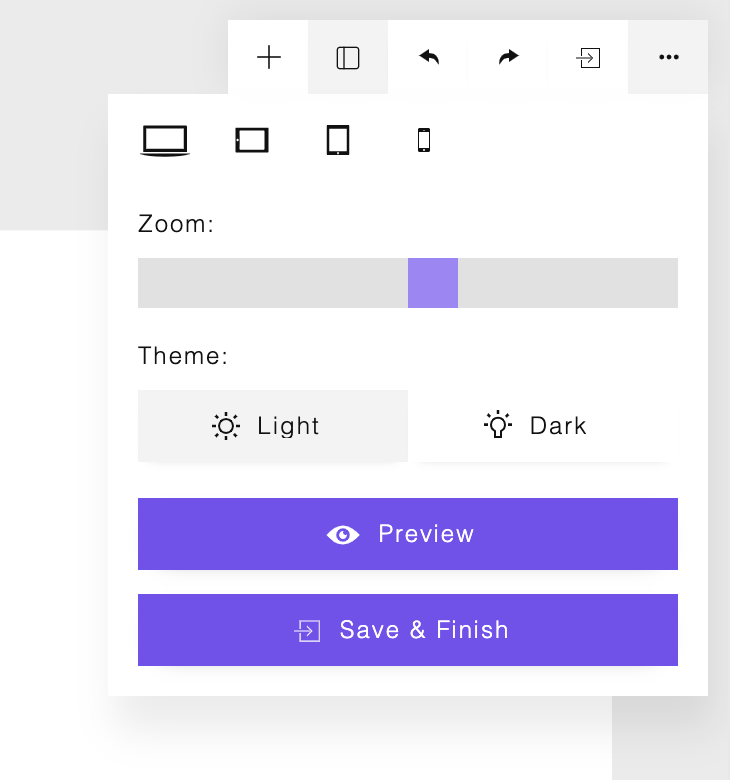
Now we see a ‘Save & Finish’ button displayed. Clicking this button will trigger the onSaveAndFinish event that saves and publishes the page..
About | Privacy | Delivery & Return
Copyright © 2021 Insite Mitra Inovindo. All Rights Reserved.